

 220
220
Overview
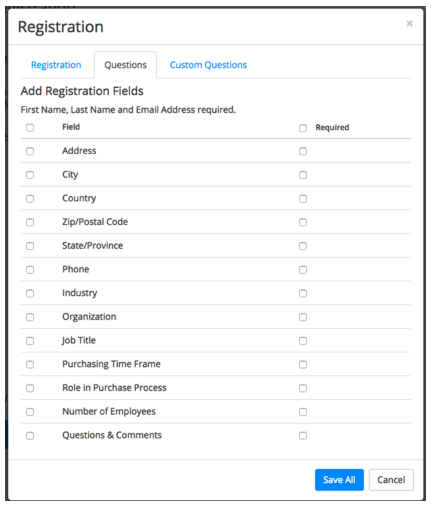
Scheduling a meeting that requires registration will allow you to have your participants register with their e-mail, name, other questions, and custom questions. You can also generate meeting registration reports if you want to download a list of people that registered.
Prerequisites
- Host user type must be Licensed. (The Shared Group Accounts are licensed accounts.)
- The meeting you are enabling registration for cannot use your Personal Meeting ID.
Instructions
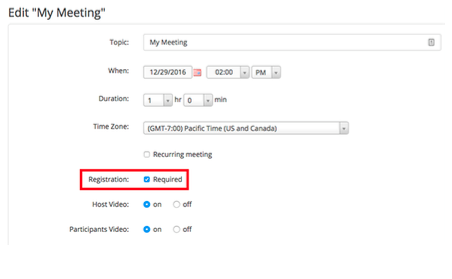
Sign into the Zoom web portal and click “Meetings”. You will be able to see the list of your scheduled meetings here. You can either schedule a new meeting or edit an existing meeting. Then check the "Registration: Required" box.
After scheduling the meeting, the Branding and Invite Attendees sections will appear. In the Branding section, you can customize your registration page with a banner and logo. In the Invite Attendees section, you can find your meeting link and the list of registrants. You can also set the type of registration for the meeting.
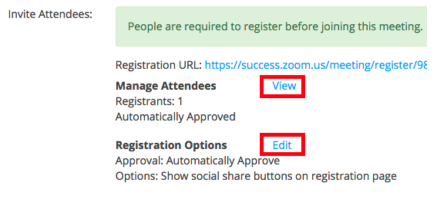
Manage Attendees
In this section you can generate a list of registrants for the particular meeting. Here you can also copy the invitation that was emailed to the registrant. Clicking on the registrant name will provide addition info about that person.
Registration Options
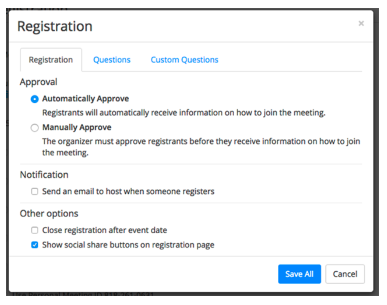
In this section you can configure the registration process by changing the approval type, registration questions, and some additional registration settings. There are 2 types of approval:
- Automatic Approval: Anyone who signs up will receive information on how to join.
- Manual Approval: Anyone who signs up will need to be approved by the host on the meeting management page.
As the host you can opt in or out for email notifications when someone registers. you can also not allow registration after the scheduled meeting time has passed.
You can also pick which registration questions are asked. Custom questions are supported.